
Opening a new tab in Selenium WebDriver refers to programmatically creating or switching browser tabs during automated test execution. In Java-based Selenium automation testing, this is typically achieved using WebDriver window handling APIs or JavaScript execution. Open a New Tab operations are commonly required when validating multi-page workflows, external links, or applications that rely on tab-based navigation.
In Selenium 4 and newer versions, the recommended approach to open a new browser tab and automatically switch to it is by using driver.switch_to.new_window() with WindowType.TAB. This method is more stable and consistent than older techniques such as keyboard shortcuts or JavaScript execution. Selenium manages tabs and windows using unique window handles, allowing testers to switch between them programmatically. The original window handle can be stored, all available handles retrieved, and focus moved as needed. The close() method closes only the active tab, while quit() ends the entire browser session by closing all tabs and windows.
Method 1: Using the newWindow API (Selenium 4+)
This is the modern, official method and provides reliable behavior across different browsers and operating systems. When a new tab is created, the driver automatically shifts focus to it.
Method 2: Using JavaScript Executor (All Selenium Versions)
For older Selenium versions (pre-4) or as an alternative, you can open a new tab using JavaScript. In this case, you will need to manually switch the driver’s focus using window_handles.
What Does “Open a New Tab” Mean in Selenium WebDriver?
In Selenium automation testing, Open a New Tab means instructing the browser to create a new tab or switch focus to an already opened tab so that automated actions can continue. Selenium WebDriver does not provide a single-purpose openNewTab() method in older versions, so testers rely on:
- Window handle management
- JavaScript execution
- Selenium 4 browser window APIs
When you Open a New Tab, Selenium treats it as a separate browser window context, identified by a unique window handle.
How Does Selenium WebDriver Handle Browser Tabs in Real-World IT Projects?
In real-world enterprise automation projects, applications often:
- Open external links in new tabs
- Use tab-based dashboards
- Trigger new tabs for authentication, reports, or downloads
When teams Open a New Tab, Selenium WebDriver internally manages each tab as a separate window. Automation engineers must explicitly switch control to the correct tab before interacting with elements.
Key Concepts Involved
- Window Handles (
getWindowHandles()) - Window Switching (
switchTo().window()) - Browser Context Management
- JavaScript-based tab creation
Failure to correctly manage this logic often leads to flaky tests or NoSuchElementException.
Why Is “Open a New Tab” Important for Working Professionals?
Understanding how to Open a New Tab is critical for professionals because modern web applications rarely operate within a single page or tab.
Professional Use Cases
- Validating third-party payment gateways
- Testing email verification links
- Automating SaaS dashboards with multiple tabs
- Handling SSO and OAuth authentication flows
In Selenium certification course projects, candidates are frequently evaluated on their ability to Open a New Tab and manage browser context correctly.
What Skills Are Required to Learn Selenium Automation Testing?
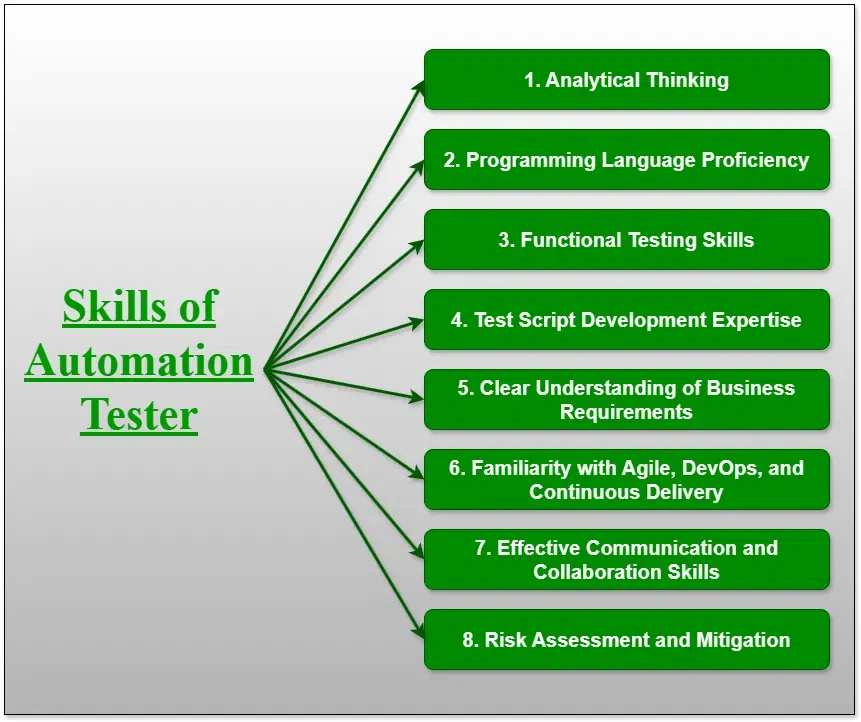
To reliably Open a New Tab in Selenium WebDriver, professionals need foundational and intermediate skills.
Core Skills
- Java programming basics
- Selenium WebDriver APIs
- HTML and DOM understanding
- Browser behavior knowledge
Advanced Skills
- JavaScript execution in Selenium
- Test framework integration (TestNG, JUnit)
- Handling dynamic UI behavior
- Synchronization and waits
These skills are typically covered in a structured Selenium course online designed for working professionals.
How Is Selenium Used in Enterprise Automation Environments?
In enterprise environments, Selenium is commonly used for:
- Regression testing
- Cross-browser validation
- CI/CD pipeline automation
- End-to-end functional testing
When applications Open a New Tab, enterprise test suites must ensure:
- Correct tab selection
- Accurate data validation
- Proper cleanup after execution
Common Enterprise Tools
| Category | Tools |
|---|---|
| Test Frameworks | TestNG, JUnit |
| Build Tools | Maven, Gradle |
| CI/CD | Jenkins, GitHub Actions |
| Reporting | Allure, Extent Reports |
What Job Roles Use Selenium WebDriver Daily?
Professionals who frequently Open a New Tab in Selenium include:
- QA Automation Engineers
- SDET (Software Development Engineer in Test)
- Test Automation Architects
- DevOps Engineers (for pipeline validation)
These roles require hands-on experience in Selenium automation testing, typically validated through a Selenium certification course.
How to Open a New Tab Using Selenium WebDriver in Java?
This section explains multiple, industry-relevant approaches to Open a New Tab using Selenium WebDriver in Java.
Method 1: Open a New Tab Using Selenium 4 Window API
Selenium 4 introduced native support to Open a New Tab.
Example (Java)
driver.switchTo().newWindow(WindowType.TAB);
driver.get("https://example.com");
Key Notes
- Supported in Selenium 4+
- Cleaner and more readable
- Preferred for modern frameworks
This approach is commonly taught in advanced Selenium automation testing modules.
Method 2: Open a New Tab Using JavaScriptExecutor
JavaScript execution is widely used in legacy or cross-browser projects.
Example
JavascriptExecutor js = (JavascriptExecutor) driver;
js.executeScript("window.open('https://example.com','_blank');");
Why This Method Is Still Used
- Works with older Selenium versions
- Useful for complex browser behavior
- Familiar to teams migrating legacy frameworks
However, after you Open a New Tab, you must explicitly switch to it.
How to Switch Between Tabs After Opening a New Tab?
Opening a new tab is only half the task. Selenium must switch focus.
Example
Set<String> windowHandles = driver.getWindowHandles();
for (String handle : windowHandles) {
    driver.switchTo().window(handle);
}
Best Practice
- Store the original window handle
- Switch back after test completion
Incorrect tab switching is one of the most common automation failures in enterprise projects.
Method 3: Open a New Tab Using Keyboard Actions
Some applications rely on keyboard shortcuts.
Example
Actions action = new Actions(driver);
action.keyDown(Keys.CONTROL)
      .click(linkElement)
      .keyUp(Keys.CONTROL)
      .build()
      .perform();
Limitations
- OS-dependent behavior
- Less reliable in CI environments
- Not recommended for large-scale test suites
Common Challenges When You Open a New Tab in Selenium
1. Window Handle Confusion
Multiple tabs can cause incorrect switching.
2. Synchronization Issues
The new tab may not load instantly.
3. Browser Compatibility
Different browsers handle Open a New Tab events differently.
4. Test Stability
Improper cleanup leads to memory leaks in long test runs.
Best Practices for Opening a New Tab in Production-Grade Automation
Recommended Practices
- Prefer Selenium 4 APIs
- Always validate window handles
- Avoid hard-coded waits
- Close unused tabs
Enterprise Tip
Wrap Open a New Tab logic into reusable utility methods for maintainability.
Realistic Project Scenario: Validating External Links
Scenario
A web application opens legal documents in a new tab.
Automation Steps
- Click the link
- Open a New Tab
- Switch context
- Validate URL and content
- Close tab
- Return to main application
This scenario is commonly used in Selenium certification course capstone projects.
How Does Opening a New Tab Fit into CI/CD Pipelines?
In CI/CD pipelines:
- Headless browsers often Open a New Tab
- Resource optimization is critical
- Tests must be deterministic
CI Considerations

| Aspect | Impact |
|---|---|
| Headless Mode | Tab behavior differs |
| Parallel Execution | Window isolation required |
| Logs & Screenshots | Capture correct tab |
Learning Path for Mastering Selenium Tab Handling
| Stage | Skills |
|---|---|
| Beginner | Basic navigation |
| Intermediate | Open a New Tab, window switching |
| Advanced | Framework integration |
| Expert | CI/CD optimization |
This progression is typically followed in a structured Selenium course online.
Frequently Asked Questions (FAQ)
How do you Open a New Tab in Selenium WebDriver Java?
You can Open a New Tab using Selenium 4’s newWindow(WindowType.TAB) or JavaScriptExecutor.
Does Selenium treat tabs and windows differently?
No. Selenium treats both as window handles.
Is JavaScriptExecutor safe for opening new tabs?
Yes, it is commonly used in enterprise automation, but requires careful window switching.
Can you Open a New Tab in headless mode?
Yes, but behavior may vary by browser and configuration.
Is this topic covered in Selenium certification training?
Yes. It is handling is a standard topic in any professional Selenium certification course.
What Careers Are Possible After Learning Selenium Automation Testing?
Professionals skilled in Selenium WebDriver, including advanced tab handling, can pursue roles such as:
- Automation Test Engineer
- SDET
- QA Lead
- Test Automation Consultant
These roles typically expect hands-on experience with scenarios where applications Open a New Tab.
Key Takeaways
- It is a fundamental Selenium WebDriver skill
- Selenium 4 provides native APIs for tab creation
- JavaScriptExecutor remains relevant in legacy systems
- Proper window switching is essential for test stability
- Enterprise automation relies heavily on accurate tab handling
Explore structured, hands-on learning through H2K Infosys programs to deepen your Selenium automation testing skills.
Enroll in a guided Selenium course to apply concepts like Open a New Tab in real-world automation projects.